Sri Lanka e-Revenue License Online Renewal 2026: Complete Step-by-Step Guide
Obtaining or renewing a vehicle revenue license in Sri Lanka previously required long queues at Divisional Secretariats. Today, through the official e-Revenue License (eRL) portal, vehicle owners in participating provinces can easily renew their revenue license online from home.
In 2026, the digital service has been further streamlined for efficiency and speed. This complete guide provides a step-by-step walkthrough on how to renew your Sri Lanka vehicle revenue license online, required documents, fee details, and delivery information.
Eligible Provinces for Online Revenue License
Currently, the e-Revenue License system is fully operational across major provinces in Sri Lanka, including:
Western Province
Southern Province
Central Province
Eastern Province
North Western Province
Sabaragamuwa Province
North Central Province
Uva Province
(Note: Always check the eRL portal to confirm service availability for your specific Provincial Council).
Required Documents & Prerequisites
Before starting your online application, ensure you have the following information and documents ready:
Vehicle Assessment/Registration Number: (e.g., WP CAB-XXXX or EP NB-XXXX).
Vehicle Chassis Number: Found on your Vehicle Registration Certificate (CR Book).
Valid Eco Test / Vehicle Emission Test Certificate: Ensure your emission test is completed and valid. The system automatically fetches this data from certified test centers.
Valid Insurance Certificate: Active third-party or comprehensive insurance details linked to your vehicle number.
Credit or Debit Card: For online fee payment (Visa, MasterCard, or LankaPay).
Active Mobile Number & Email Address: To receive transaction confirmation and tracking details.
Step-by-Step Process to Renew Revenue License Online
Follow these simple steps to complete your revenue license renewal online:
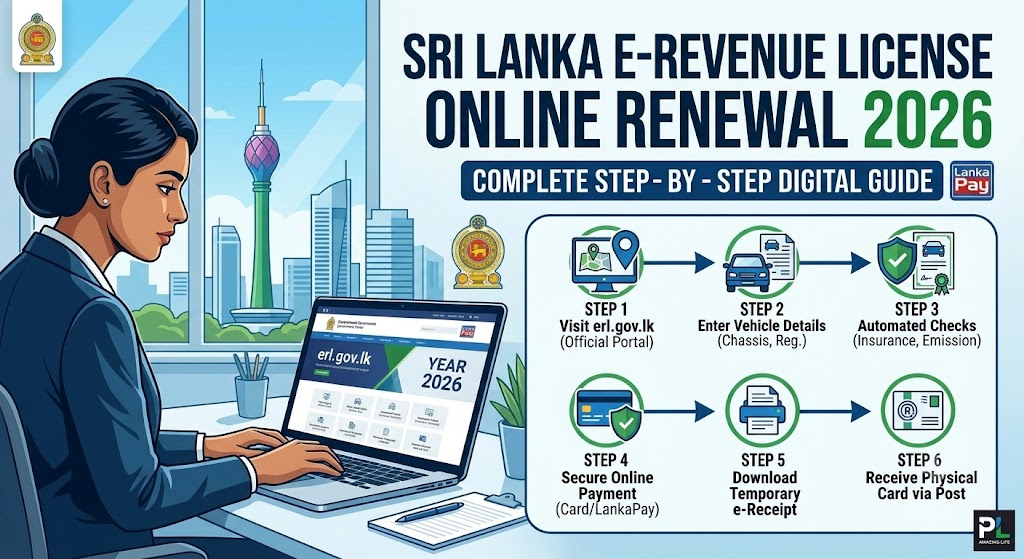
Step 1: Access the Official eRL Portal
Open your web browser and navigate to the official Sri Lanka Government e-Revenue License portal at erl.gov.lk.
Step 2: Select Your Province
On the homepage, select the Provincial Council / Province where your vehicle is officially registered.
Step 3: Enter Vehicle Details
Input your Vehicle Registration Number accurately.
Enter the last 4 or 5 digits of your Chassis Number for identity verification.
Click Submit or Validate.
Step 4: System Verification
The portal will automatically check and verify your details against government databases:
Verification of valid Vehicle Emission Test.
Verification of active Insurance Coverage.
Step 5: Complete Fee Payment
Review the calculated revenue license fee, including any applicable stamp duties or arrears.
Choose your preferred online payment method (Debit/Credit Card).
Enter card details and complete the OTP authentication process securely.
Step 6: Obtain Temporary e-Receipt
Upon successful payment, a digital confirmation receipt (e-Receipt) will be generated. Download and print this temporary receipt immediately. It serves as legal proof of renewal until your physical license arrives.
Delivery of Physical Revenue License
Courier Delivery: The official printed Revenue License card/sticker will be delivered directly to your registered postal address via registered post or postal courier service within 3 to 7 working days.
Tracking: You can track the delivery status using the transaction reference number provided upon submission.
Frequently Asked Questions (FAQs)
Q1: Is the printed e-Receipt legally valid while driving?
Answer: Yes, the downloadable e-Receipt printed from the official portal is recognized as temporary proof of valid revenue licensing for a specified period until the physical card is delivered.
Q2: What should I do if the system shows “Emission Test Not Found”?
Answer: Ensure that your emission test center has uploaded your test records to the central server. It can take up to 24 hours for new test records to update on the eRL portal.
Q3: Can I renew my revenue license online if it has expired for over a year?
Answer: Online renewal is intended for timely renewals or minor arrears. For extended expired licenses with heavy penalties, you may need to visit your local Divisional Secretariat office directly.
Conclusion
Renewing your vehicle revenue license online via erl.gov.lk saves time and hassle. Keep your insurance and emission test up to date, follow the steps above, and enjoy a seamless digital experience in 2026.